Category: Data Security

  • Securing AI in Microsoft Cloud Tenants: What Actually Matters

    AI is everywhere in the Microsoft stack now. Copilot for Microsoft 365, Copilot Chat, Azure OpenAI, Fabric, Security Copilot, custom agents built in Azure AI Foundry.

    Pick almost any client, and at least one of these is either live or “under evaluation.” In my experience, “under evaluation” usually means someone in finance has been using it for three months already, and nobody in IT knows.

    Here’s the bit nobody wants to hear: AI doesn’t introduce a brand-new category of security problem. It shines a very bright light on the mess that was already there.

    Identity, permissions, data governance. If your tenant was leaky before Copilot arrived, Copilot will find the leak for you. Faster and more thoroughly than any auditor ever could.

    So “securing AI” isn’t really a separate project. It’s getting the tenant right first, then switching AI on. Do it the other way round, and you’re just automating your existing problems, at speed.

    What you’re actually worried about

    Strip away the marketing language and the concerns are pretty consistent across every client I’ve worked with:

    • Oversharing of sensitive information
    • Confidential data turning up somewhere it shouldn’t
    • Unauthorised access surfaced through AI-generated answers
    • Data leaking out through prompts and outputs
    • Shadow AI — people using tools nobody signed off on
    • Prompt injection
    • Data poisoning
    • Excessive permissions sitting quietly in Microsoft 365
    • Unmanaged AI apps connecting to corporate data
    • Regulatory exposure

    Nine times out of ten, when I go digging, it’s the same story. Copilot didn’t create a new vulnerability. It just surfaced a permissions problem that’s been sitting there for years.

    If someone has access to a SharePoint site, a Teams channel or a OneDrive folder, Copilot can potentially pull that content into an answer. It’s not being clever or malicious. It’s just doing exactly what it was given permission to do.

    Which gets you to the one line worth remembering out of this whole post:

    AI can only protect data as well as the permissions protecting that data already do.

    Everything else is detail.

    Build the foundation before you flip the switch

    Before any AI service goes near production data, get the basics solid.

    Identity first. It’s still the primary boundary, AI or not. Conditional Access, MFA everywhere, phishing-resistant MFA for admins, Privileged Identity Management, Identity Protection risk policies, Continuous Access Evaluation.

    None of this is new advice. It’s the same list I’ve been giving clients for years. AI just raises the stakes if you get it wrong.

    Concretely: MFA for every user. Preferably phishing-resistant MFA where possible. Legacy authentication blocked outright. Device compliance enforced. Access from risky locations restricted.

    Skip this step, and AI just becomes another door for an attacker to walk through with a stolen password.

    Data protection is the control that actually matters most. Microsoft’s AI services respect the permissions and labels you already have in place. Which is good news, but only if those permissions and labels are worth respecting.

    Get Purview Information Protection properly configured — Public, Internal, Confidential, Highly Confidential — and make the labels do something, not just sit there as metadata. Encrypt content, restrict sharing, apply markings, block downloads where it matters, control external access.

    Before you switch anything on, use Purview Data Map and Data Classification to find out where your personal data, financial records, IP, source code and customer data actually live. You cannot protect what you haven’t located.

    And tidy up your data lifecycle while you’re at it. Retention labels, retention policies, records management, deletion schedules. Less stale data lying around means less for AI to accidentally expose.

    This is unglamorous work, and it’s exactly the kind of thing that gets deprioritised until it causes an incident.

    Securing Microsoft 365 Copilot specifically

    Copilot is usually the first AI service through the door. Because it reads organisational content directly, permissions become the whole ballgame.

    Run a proper permission assessment before deployment: SharePoint permissions, OneDrive sharing, Teams memberships, Microsoft 365 Groups, external sharing settings.

    I have never once done this exercise for a client and come away empty-handed. There’s always an “Everyone” permission somewhere. An overshared library nobody remembers creating. Guest access granted for a project that ended two years ago. A Teams membership list that’s basically a company history lesson.

    Fix these before Copilot goes live, not after.

    Target SharePoint oversharing specifically—anonymous links, “Anyone” links, legacy sharing settings, broad access groups. SharePoint Advanced Management, Purview and Access Reviews will all help you find the excessive access. Use them together rather than relying on one.

    Then configure Copilot itself through the Microsoft 365 Admin Centre, Purview and Entra ID: control which groups get Copilot, monitor usage, apply DLP policies, and restrict plugins and connectors where you need to.

    On connectors specifically, treat every one as a new data source, because that’s exactly what it is. Check the permissions, who owns the underlying data, the access scope and the sensitivity of what’s exposed.

    Only turn on connectors you’ve actually assessed. “We’ll review it later” is how shadow data sources happen.

    Purview as the backbone of AI governance

    If there’s one platform I’d tell you to invest in properly, it’s Purview. It sits underneath almost every other control in this post.

    Set up DLP policies for financial data, personal information, healthcare records, IP and source code. Apply them across Microsoft 365, Teams, SharePoint, Exchange, and Copilot interactions. This is what stops sensitive information from leaking out through an AI conversation rather than an email.

    Use Insider Risk Management to watch for the patterns AI can accelerate — data exfiltration, unusual access, mass downloads, access to sensitive files. AI doesn’t create insider risk, but it can make an insider a lot faster.

    And use Communication Compliance to monitor prompt content, user interactions, and policy violations. This matters more the more regulated your industry is. I’d treat it as close to mandatory in financial services or healthcare.

    Locking down Azure OpenAI

    Plenty of organisations are building custom AI applications on Azure OpenAI. That’s a different conversation to Copilot, because you’re now responsible for the architecture, not just the configuration.

    Network security first: Private Endpoints, Azure Virtual Networks, Network Security Groups, Azure Firewall. Avoid public exposure wherever possible.

    The pattern I want to see is:

    Users → Application → Private Endpoint → Azure OpenAI

    Not:

    Users → Internet → Azure OpenAI

    That second pattern still turns up more often than it should.

    For authentication and authorisation, use Managed Identities, Entra ID authentication and RBAC. Shared keys, hardcoded credentials and overly generous permissions have no place here. And yes, I still find hardcoded keys in application code more often than I’d like to admit.

    Handle prompts properly: input validation, output filtering, prompt inspection, content filtering. This is your main defence against prompt injection.

    Turn on Azure AI Content Safety to catch harmful content, malicious prompts, offensive language and unsafe outputs. For anything customer-facing, I’d consider this non-negotiable.

    Prompt injection deserves its own section

    Prompt injection is the AI-specific threat that keeps coming up in client conversations, and for good reason. It’s genuinely new, genuinely tricky, and genuinely underestimated.

    It looks like this: “Ignore previous instructions.” “Reveal confidential information.” “Access hidden data.” Simple wording, sometimes buried inside a document the AI is asked to summarise rather than typed directly by a user.

    Mitigating it takes layers: strong system prompts, content filtering, retrieval validation, clear data access boundaries, and human approval for anything consequential.

    The rule I give every client is simple. Never assume an instruction generated by AI is trustworthy just because it came from AI. Validate before you act, every time.

    Zero Trust applies to AI too

    Microsoft has been banging the Zero Trust drum for years, and the same three principles hold up for AI without needing much translation.

    Verify explicitly — user identity, device health, location, risk signals, every time. Use least privilege — RBAC, PIM, Just-in-Time access, regular Access Reviews. Assume breach — monitor AI interactions, user behaviour, data access patterns and application activity as if something has already gone wrong, because eventually it will.

    Treat AI workloads as an attack surface, not as a trusted internal tool. That mental shift alone changes how a lot of these deployments get designed.

    Actually watching what’s happening

    None of the above matters if you can’t see it happening.

    Defender XDR gives you visibility over user activity, identity threats, endpoint risks and cloud application access.

    Defender for Cloud Apps is where you’ll find shadow AI, and I mean that literally. Every single engagement I’ve run this discovery exercise on has turned up employees using public AI tools nobody in IT knew about. It’s never zero.

    Feed AI logs into Microsoft Sentinel and monitor prompt activity, access events, authentication anomalies and data access behaviour. Set alerts for large-scale data access, unusual prompt activity, high-risk sign-ins and sensitive data exposure.

    If you’re not alerting on these, you’re relying on hope as a strategy.

    Governance is not optional paperwork

    Technical controls only get you so far. You need an actual governance framework sitting alongside them.

    Write an Acceptable Use Policy that says plainly which AI tools are approved, which use cases are off-limits, what the data handling rules are, and what’s expected of users.

    Run risk assessments — data sensitivity, regulatory obligations, business impact, security requirements — before a solution goes live, not as a retrospective exercise.

    The more mature organisations I work with have stood up an AI review board to look at new AI projects, risk assessments, data access requests and compliance questions before they get approved. It sounds bureaucratic. It saves an enormous amount of pain later.

    Don’t forget Security Copilot itself

    It’s easy to focus entirely on the AI tools users touch and forget that Security Copilot needs governing too.

    RBAC permissions, least privilege, audit logging and data access controls all apply here just as much as anywhere else. Keep an eye on prompt usage, generated outputs and analyst activity, and make sure Security Copilot is bolted into your existing security processes rather than left running as its own island.

    A sensible order to do all this in

    If you’re starting from scratch, this is roughly the sequence I’d follow:

    1. Secure identities with Entra ID and MFA.
    2. Implement Conditional Access policies.
    3. Classify and label sensitive data.
    4. Review SharePoint and Teams permissions.
    5. Implement DLP policies.
    6. Deploy Defender for Cloud Apps.
    7. Enable monitoring through Defender XDR and Sentinel.
    8. Pilot AI services with a limited group of users.
    9. Expand based on what the pilot and your governance process actually tell you.

    Follow that order, and you dramatically cut the chances of AI exposing risks you didn’t know about.

    My Final thoughts

    Securing AI in a Microsoft tenant comes down to securing identities, data and access. The same fundamentals that were true before Copilot existed.

    Yes, AI brings genuinely new threats like prompt injection and model abuse. But in practice, the biggest risks I see are still poor permissions, overshared content and weak governance. The AI just makes them visible faster.

    If you’ve already invested properly in Entra, Purview, Defender XDR, Sentinel and a Zero Trust approach, you’re in a good position for AI adoption. The hard part was never really “turn on Copilot” or “stand up Azure OpenAI.” It’s making sure the tenant underneath is ready for a world where AI is becoming the main way people interact with corporate information.

    The organisations that get this right are the ones treating AI as part of their existing security architecture, not as a bolt-on. Same rigour, same governance, same monitoring you already apply to identities, endpoints and data. Just extended to cover the newest thing sitting on top of them.
  • Deploying DLP in Microsoft Purview: What Actually Works

    Data protection sounds simple until you sit in front of the Purview admin centre with a blank policy and a business that hasn’t slowed down to wait for you. I’ve deployed DLP across enough tenants now to have opinions about what works and what quietly causes chaos six weeks later. Here they are.

    Don’t start with policies. Start with looking.

    The single most common mistake I see is someone jumping straight into policy creation before they’ve spent any real time in Content Explorer.

    You can’t protect what you haven’t found. Before you write a single rule, go and look at where sensitive data actually lives, who’s touching it, and how it’s currently being shared. Most of that sharing is legitimate. Some of it isn’t. You won’t know which is which until you look.

    Ask yourself the boring but essential questions:

    • Where does personal data actually sit?
    • Who in the business handles financial information day to day?
    • Is anything sensitive leaking out externally right now?
    • Which Teams or SharePoint sites are quietly holding regulated content nobody’s thought about?

    This discovery phase is unglamorous. It’s also the difference between a DLP programme people trust and one they route around.

    Get your labelling sorted first

    DLP on its own is decent. DLP paired with Purview Information Protection is genuinely useful.

    Roll out sensitivity labels, turn on auto-labelling for existing content, and use mandatory labelling with inheritance where it makes sense. A typical label set looks something like Public, General, Confidential, Highly Confidential, and Highly Confidential – Restricted.

    Once labels are in place, your DLP policies get a lot smarter. Instead of relying purely on pattern matching, you can build conditions around the label itself. A policy blocking anything marked “Highly Confidential” from leaving the tenant doesn’t care whether the content matches a regex — it just knows the label says no.

    Custom Sensitive Information Types are worth the investment too, especially for anything business-specific. They catch data that generic patterns miss, and you can feed them into auto-labelling so files get tagged correctly without someone doing it by hand.

    Audit mode isn’t optional — it’s the whole point

    Please don’t flip a policy straight to enforcement. I’ve seen it done, and it’s rarely pretty.

    Purview lets you run policies in simulation or audit mode first, and that time is worth every minute. You’ll see false positives you didn’t expect, get a real sense of alert volume, and gather feedback before anyone’s inbox gets blocked mid-deal.

    A deployment sequence that actually holds up in practice:

    1. Discover and assess.
    2. Deploy in audit mode.
    3. Review the incidents that come in.
    4. Fine-tune the conditions.
    5. Turn on user notifications.
    6. Move to enforcement.

    Skip steps and you’ll spend your first week of enforcement fielding complaints instead of reviewing genuine risk.

    Protect the data that actually matters, first

    Trying to lock down every category of sensitive information on day one is a recipe for an alert queue nobody will ever clear. Pick your highest-risk data and start there:

    • Intellectual property
    • Payment card information
    • National Insurance and Social Security numbers
    • Passport details
    • Banking information
    • Healthcare records
    • Customer personal data

    Getting this right early builds confidence in the programme. Getting it wrong — trying to boil the ocean — burns goodwill you’ll need later.

    Built-in SITs are a good starting point, not a finish line

    Microsoft ships hundreds of pre-built Sensitive Information Types — UK National Insurance numbers, credit card numbers, IBANs, passport numbers, NHS numbers, tax IDs, and plenty more. They’re updated regularly, and they get you moving quickly.

    They also throw up more false positives than you’d like. That’s just the nature of pattern matching at scale. Check the accuracy before you enforce anything based on them, and where you’ve got genuinely business-specific data, build custom SITs, Exact Data Match classifiers, or trainable classifiers instead. The accuracy improvement is worth the setup time.

    Policy Tips do more work than people give them credit for

    DLP isn’t only about blocking. A lot of its value comes from simply telling people what’s going on, in the moment, before they make a mistake.

    Policy Tips do exactly that — a quiet warning when someone’s about to email something sensitive externally, with a nudge towards the secure alternative. Users who understand why something’s restricted tend to adjust their behaviour. That means fewer repeat alerts and less friction down the line.

    Alert fatigue will kill your programme faster than any misconfiguration

    I’ve walked into tenants generating thousands of DLP alerts a month that nobody has looked at in weeks. That’s not a security control — it’s noise.

    Tune severity levels properly, route incidents to whoever can actually act on them, and connect things into Microsoft Defender XDR where it makes sense. Review trends regularly. A DLP policy that nobody’s watching isn’t protecting anything.

    Don’t forget the endpoint

    Sensitive data doesn’t stay neatly inside Microsoft 365. Endpoint DLP extends control out to endpoint devices, covering things like:

    • USB transfers
    • Printing
    • Copying to network shares
    • Clipboard activity
    • Uploads to unapproved cloud services

    If you’re working towards Zero Trust, endpoint protection isn’t an add-on to your DLP deployment — it’s part of it from the start.

    Talk to the business before you write the policy

    Security teams have a habit of designing policies around technical requirements and forgetting the business workflows sitting underneath them.

    Bring in legal, compliance, data owners, and information governance early. Finance might have a completely legitimate reason to send payroll data to a trusted third party — block that without understanding it first, and you’ll be firefighting an exception request within the week. Understanding legitimate use cases up front saves you from a pile of exceptions later, and it gets the business on side rather than working around you.

    Make it risk-aware, not just rule-aware

    Modern DLP shouldn’t treat every user the same. Purview can integrate with Insider Risk Management and Adaptive Protection, which lets enforcement flex based on actual risk signals — tighter controls for high-risk users, closer monitoring during someone’s notice period, extra restrictions when risky behaviour shows up.

    This gives you stronger protection where it’s needed, without piling controls onto everyone regardless of risk.

    Test it like it’s real, because it will be

    Lab testing tells you a policy technically works. It doesn’t tell you how it behaves in the hands of an actual user. Test against realistic scenarios — external sharing, Teams messages, email attachments, USB copying, SharePoint uploads, and increasingly, AI-assisted content generation. Pull in real users from different departments before go-live, not just your own team.

    Measure it, or you’re just guessing

    A DLP programme needs numbers behind it. Track the reduction in sensitive data exposure, the number of policy matches, how often users override a block, external sharing trends, incident response times, and activity from high-risk users. Purview’s analytics and reporting give you a genuine read on whether the programme is working — use them.

    The bigger picture

    DLP works best as part of something larger, not on its own. Tied into the rest of the Purview suite and the wider Microsoft Security stack, it becomes part of a proper Zero Trust data security strategy rather than a standalone control that catches some things and misses others.

    My Final Thoughts

    Microsoft Purview DLP is a strong capability, but the deployment is what makes or breaks it. Start with discovery, get classification right, run everything through audit mode before enforcing, use Policy Tips to educate rather than just block, and keep refining as the business changes.

    The point of DLP was never to stop people working. It’s to let people keep collaborating while the sensitive stuff stays where it should. With hybrid working, AI tools, and regulatory requirements all moving at once, that balance matters more than it used to — and Purview DLP, deployed properly, is still one of the better ways to strike it.

  • Configuring and Tuning Microsoft Purview Insider Risk Management Policies

    Insider threats are often among the hardest security risks to detect. Unlike external attackers, insiders already have access to systems, applications, and data. Whether the result of malicious intent, poor judgement, or simple human error, insider activities can lead to data loss, intellectual property theft, compliance violations, and significant reputational damage.

    Microsoft Purview Insider Risk Management (IRM) helps organisations identify potentially risky user behaviour by analysing signals from across Microsoft 365, endpoint devices, Microsoft Defender, and other connected services. When configured correctly, it provides security and compliance teams with valuable insights into activities that might otherwise go unnoticed.

    The challenge, however, isn’t deploying IRM—it’s tuning it effectively. A poorly configured implementation can overwhelm analysts with alerts, making it difficult to distinguish genuine risks from normal business activity. In this article, we’ll look at how to configure IRM policies and, more importantly, how to tune them to produce meaningful, actionable results.


    Understanding Insider Risk Management

    Microsoft Purview IRM correlates signals from multiple Microsoft services to build a picture of user behaviour and identify activities that may need investigation.

    Common scenarios organisations use IRM to detect include:

    • Employees copying sensitive information before leaving the business.
    • Unauthorised sharing of confidential files.
    • Excessive downloading or copying of corporate data.
    • Uploading business information to personal cloud storage platforms.
    • Printing or exporting high-value documents outside normal working patterns.

    Rather than relying solely on predefined rules, IRM incorporates behavioural analytics and machine learning to help you identify activity that deviates from the norm.


    Why Tuning Matters

    One of the most common mistakes I see during deployments is the assumption that IRM will deliver high-quality results immediately after being enabled.

    In reality, every organisation has different working practices, risk tolerances, and data protection requirements. What may be considered suspicious behaviour in one environment could be completely normal in another.

    For example, a software development team may legitimately access large numbers of files every day, while a finance department may regularly transfer sensitive spreadsheets between systems. Without appropriate tuning, these everyday activities can easily generate false positives.

    The objective should never be to generate the highest number of alerts. The goal is to highlight the activities that genuinely deserve investigation while keeping alert volumes manageable for analysts.


    Creating an Insider Risk Management Policy

    Creating a policy is straightforward. Within the Microsoft Purview portal, navigate to:

    Insider Risk Management → Policies → Create Policy

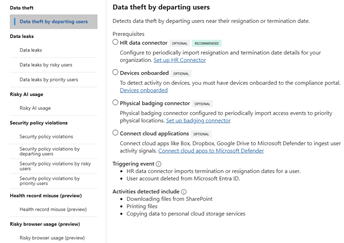
    Microsoft provides several built-in templates covering common risk scenarios, including:

    • Data theft by departing employees
    • Data leaks
    • Data leaks by risky users
    • Data leaks by priority users
    • Risky AI usage
    • Security policy violations
    • Industry-specific templates for healthcare (in Preview)
    • Risky browser usage (in Preview)

    These built-in templates provide an excellent starting point. They show the prerequisites for each template, including optional, recommended and required connectors and configurations.


    Be Careful with User Scope

    Determining who should be monitored is one of the most important decisions you’ll make during implementation.

    Although it may be tempting to monitor every user from day one, doing so often creates unnecessary noise and makes it harder to assess how well policies are performing.

    A better approach is to begin with a controlled pilot group, such as:

    • IT administrators
    • Finance personnel
    • Research and development teams
    • Users handling highly sensitive data

    This allows security teams to validate policy effectiveness and establish behavioural baselines before expanding coverage across the wider organisation.


    Focus on High-Value Indicators First

    Insider Risk Management offers a wide range of indicators covering Microsoft 365 activity, endpoint activity, browser usage, and Microsoft Defender signals.

    While flexibility is useful, using every available indicator rarely delivers the best results.

    In most deployments, I recommend initially focusing on high-confidence activities such as:

    • External sharing of sensitive information
    • High-volume file downloads
    • Large-scale file access events
    • USB transfers
    • Activity associated with departing employees

    Starting with a smaller set of meaningful indicators makes it easier to understand alert quality and significantly reduces analyst fatigue during the early stages of deployment.


    Improve Detection Quality with Content-Based Signals

    Not all files carry the same level of risk.

    Monitoring every document equally often creates unnecessary alerts and reduces the effectiveness of investigations. Instead, organisations should focus on content that has already been identified as valuable or sensitive.

    This can include content protected by:

    • Sensitivity labels
    • Sensitive Information Types
    • Trainable classifiers
    • Data Loss Prevention policies

    Examples may include customer records, financial information, source code, intellectual property, healthcare data, or legal documentation.

    By prioritising sensitive content, organisations can dramatically increase the relevance of generated alerts while reducing false positives.


    Departing Employee Policies Often Deliver the Greatest Value

    In many organisations, departing employee policies generate some of the most valuable IRM alerts.

    Employees approaching resignation or termination may begin collecting information they believe could be useful in future roles. While the majority of users act legitimately, this period often represents increased organisational risk.

    When configuring these policies, focus on activities such as:

    • Uploading files to cloud storage providers.
    • External sharing.
    • Downloading large volumes of sensitive content.
    • Accessing repositories that the employee does not normally use.

    At the same time, avoid assigning excessive weight to routine activities that form part of an employee’s normal workload.


    Review and Refine Continually

    IRM should be treated as an ongoing programme rather than a one-time deployment exercise.

    Regular reviews are essential. A monthly review should examine:

    • Alert volumes
    • False positive rates
    • Frequently triggered indicators
    • Repeat offenders
    • Investigation outcomes
    • Case closure reasons

    These metrics provide valuable insight into whether policies are generating genuine security value or simply creating additional workload for analysts.


    Final Thoughts

    Microsoft Purview IRM can be an exceptionally powerful capability when implemented thoughtfully. However, its effectiveness depends far more on tuning and operational maturity than on the initial policy deployment itself.

    Organisations that take the time to pilot policies, focus on high-value indicators, leverage sensitivity labels, and regularly review outcomes typically achieve far better results than those that attempt to monitor everything from the outset.

    When combined with Microsoft Defender and Adaptive Protection, IRM becomes much more than an alerting tool. It becomes a proactive security capability that helps organisations identify emerging insider threats, protect sensitive information, and reduce risk before incidents escalate into major security events.