Insider threats are often among the hardest security risks to detect. Unlike external attackers, insiders already have access to systems, applications, and data. Whether the result of malicious intent, poor judgement, or simple human error, insider activities can lead to data loss, intellectual property theft, compliance violations, and significant reputational damage.
Microsoft Purview Insider Risk Management (IRM) helps organisations identify potentially risky user behaviour by analysing signals from across Microsoft 365, endpoint devices, Microsoft Defender, and other connected services. When configured correctly, it provides security and compliance teams with valuable insights into activities that might otherwise go unnoticed.
The challenge, however, isn’t deploying IRM—it’s tuning it effectively. A poorly configured implementation can overwhelm analysts with alerts, making it difficult to distinguish genuine risks from normal business activity. In this article, we’ll look at how to configure IRM policies and, more importantly, how to tune them to produce meaningful, actionable results.
Understanding Insider Risk Management
Microsoft Purview IRM correlates signals from multiple Microsoft services to build a picture of user behaviour and identify activities that may need investigation.
Common scenarios organisations use IRM to detect include:
- Employees copying sensitive information before leaving the business.
- Unauthorised sharing of confidential files.
- Excessive downloading or copying of corporate data.
- Uploading business information to personal cloud storage platforms.
- Printing or exporting high-value documents outside normal working patterns.
Rather than relying solely on predefined rules, IRM incorporates behavioural analytics and machine learning to help you identify activity that deviates from the norm.
Why Tuning Matters
One of the most common mistakes I see during deployments is the assumption that IRM will deliver high-quality results immediately after being enabled.
In reality, every organisation has different working practices, risk tolerances, and data protection requirements. What may be considered suspicious behaviour in one environment could be completely normal in another.
For example, a software development team may legitimately access large numbers of files every day, while a finance department may regularly transfer sensitive spreadsheets between systems. Without appropriate tuning, these everyday activities can easily generate false positives.
The objective should never be to generate the highest number of alerts. The goal is to highlight the activities that genuinely deserve investigation while keeping alert volumes manageable for analysts.
Creating an Insider Risk Management Policy
Creating a policy is straightforward. Within the Microsoft Purview portal, navigate to:
Insider Risk Management → Policies → Create Policy
Microsoft provides several built-in templates covering common risk scenarios, including:
- Data theft by departing employees
- Data leaks
- Data leaks by risky users
- Data leaks by priority users
- Risky AI usage
- Security policy violations
- Industry-specific templates for healthcare (in Preview)
- Risky browser usage (in Preview)
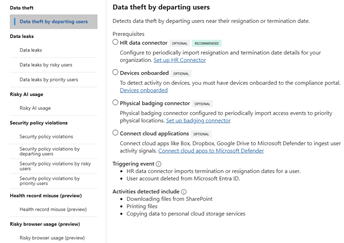
These built-in templates provide an excellent starting point. They show the prerequisites for each template, including optional, recommended and required connectors and configurations.
Be Careful with User Scope
Determining who should be monitored is one of the most important decisions you’ll make during implementation.
Although it may be tempting to monitor every user from day one, doing so often creates unnecessary noise and makes it harder to assess how well policies are performing.
A better approach is to begin with a controlled pilot group, such as:
- IT administrators
- Finance personnel
- Research and development teams
- Users handling highly sensitive data
This allows security teams to validate policy effectiveness and establish behavioural baselines before expanding coverage across the wider organisation.
Focus on High-Value Indicators First
Insider Risk Management offers a wide range of indicators covering Microsoft 365 activity, endpoint activity, browser usage, and Microsoft Defender signals.
While flexibility is useful, using every available indicator rarely delivers the best results.
In most deployments, I recommend initially focusing on high-confidence activities such as:
- External sharing of sensitive information
- High-volume file downloads
- Large-scale file access events
- USB transfers
- Activity associated with departing employees
Starting with a smaller set of meaningful indicators makes it easier to understand alert quality and significantly reduces analyst fatigue during the early stages of deployment.
Improve Detection Quality with Content-Based Signals
Not all files carry the same level of risk.
Monitoring every document equally often creates unnecessary alerts and reduces the effectiveness of investigations. Instead, organisations should focus on content that has already been identified as valuable or sensitive.
This can include content protected by:
- Sensitivity labels
- Sensitive Information Types
- Trainable classifiers
- Data Loss Prevention policies
Examples may include customer records, financial information, source code, intellectual property, healthcare data, or legal documentation.
By prioritising sensitive content, organisations can dramatically increase the relevance of generated alerts while reducing false positives.
Departing Employee Policies Often Deliver the Greatest Value
In many organisations, departing employee policies generate some of the most valuable IRM alerts.
Employees approaching resignation or termination may begin collecting information they believe could be useful in future roles. While the majority of users act legitimately, this period often represents increased organisational risk.
When configuring these policies, focus on activities such as:
- Uploading files to cloud storage providers.
- External sharing.
- Downloading large volumes of sensitive content.
- Accessing repositories that the employee does not normally use.
At the same time, avoid assigning excessive weight to routine activities that form part of an employee’s normal workload.
Review and Refine Continually
IRM should be treated as an ongoing programme rather than a one-time deployment exercise.
Regular reviews are essential. A monthly review should examine:
- Alert volumes
- False positive rates
- Frequently triggered indicators
- Repeat offenders
- Investigation outcomes
- Case closure reasons
These metrics provide valuable insight into whether policies are generating genuine security value or simply creating additional workload for analysts.
Final Thoughts
Microsoft Purview IRM can be an exceptionally powerful capability when implemented thoughtfully. However, its effectiveness depends far more on tuning and operational maturity than on the initial policy deployment itself.
Organisations that take the time to pilot policies, focus on high-value indicators, leverage sensitivity labels, and regularly review outcomes typically achieve far better results than those that attempt to monitor everything from the outset.
When combined with Microsoft Defender and Adaptive Protection, IRM becomes much more than an alerting tool. It becomes a proactive security capability that helps organisations identify emerging insider threats, protect sensitive information, and reduce risk before incidents escalate into major security events.